SharePoint Subsites Need to Go
Here’s Why 2026 Is the Year to Act
If your SharePoint environment still runs on subsites, you are not alone. But the clock is ticking. Microsoft has not published a retirement date yet, though the signals in the Microsoft 365 community are clear subsites will soon officially become a legacy problem with many expecting an announcement at Microsoft Ignite. Either way, waiting is a risk your organization should not take.
What Are SharePoint Subsites (and Why Do Organizations Still Have Them)?
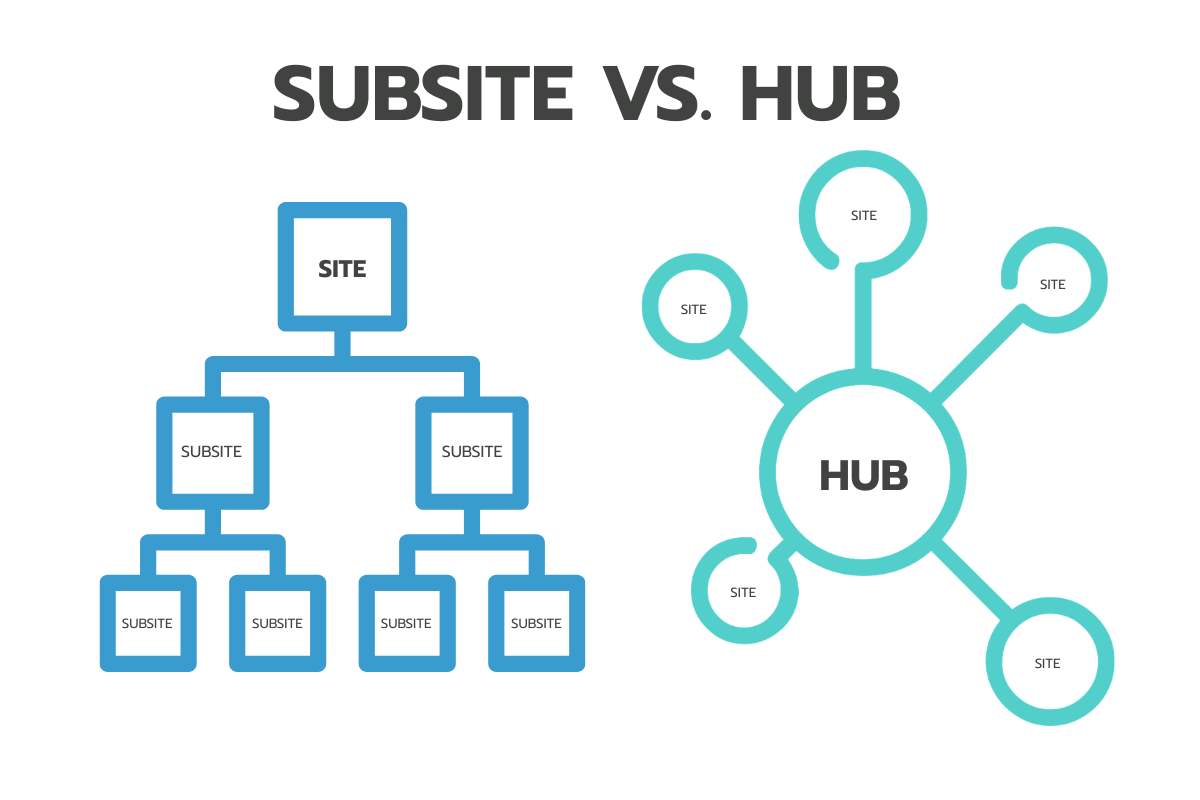
Subsites are child sites nested beneath a parent SharePoint site. They were once the standard way to organize content hierarchically. Think of a company intranet with subsites for HR, Finance, and IT all branching off a single root site. This approach made sense in older on-premises SharePoint environments where the hierarchy mirrored an org chart.
The problem is that many organizations carried this structure straight into SharePoint Online during migration. A lift-and-shift migration preserved the old architecture without accounting for how SharePoint had fundamentally changed. The intent was always to clean it up later and later has arrived.
Hub Sites: The Modern Alternative
Hub sites replace the rigid parent-child hierarchy of subsites with a flat architecture where independent site collections are associated together. Instead of nesting sites under one another, hub sites connect them logically while keeping each site its own independent entity.
Each site collection in a hub architecture has its own permissions, governance policies, and lifecycle. Navigation and branding can roll up consistently across associated sites without the tight dependency that makes subsite management so painful. Hub sites also integrate cleanly with Microsoft Teams, Viva, and the rest of the M365 ecosystem, something subsites were never designed to do.
Why It’s Time to Ditch SharePoint Subsites
Beyond the internal pressure to modernize, there is an external one: Microsoft Copilot. Copilot depends on clean, well-structured content with clear permissions and defined ownership. Subsites are the opposite of that. Broken permission inheritance, outdated content, and unclear site ownership all degrade Copilot’s ability to surface accurate, trustworthy results for your users.
If your organization is planning a Copilot deployment or is already live, your SharePoint architecture is not a back-burner item, it is a prerequisite.
Top 5 Reasons Why Subsites Are Holding You Back
1. Security and Permissions
Subsites are notorious for broken permission inheritance. Over time, unique permissions get applied at various levels, making it genuinely difficult to answer the question of who has access to what. That increases audit complexity and creates real exposure when sensitive content lands in the wrong hands. Flat architecture with hub sites simplifies permission management.
2. Search and Navigation
Deep subsite hierarchies are frustrating to navigate. Content gets buried, search relevance suffers, and users struggle to understand where they are or where anything lives. When people cannot find what they need, they either give up or start storing their own copies, which feeds a content duplication problem that subsites already encourage. Modern sites and hubs improve search relevance and visibility while promoting shared content services over duplication.
3. Governance and Lifecycle Management
Retention policies, archival rules, and lifecycle automation are all significantly easier to apply to independent site collections than to nested subsites. Orphaned sites with no clear owner and content untouched for years are common in subsite-heavy environments, and they represent real compliance exposure. Modern sites allow you to assign ownership, set lifecycle policies, and apply governance automation in ways subsites simply do not support.
4. Microsoft 365 Integration and Scalability
Microsoft Teams creates site collections, not subsites. That mismatch means your Teams workspaces and your subsite architecture are pulling in different directions from day one. The same friction applies to Power Platform, Viva, and any modern Microsoft 365 integration. Flat, hub-based architecture aligns with how the platform was designed to work at scale, and it is far more flexible as your organization grows or reorganizes.
5. Reporting and Administration
Inventorying subsites, tracking usage, and applying governance tooling consistently requires workarounds that flat architecture does not. Modern SharePoint management tools, including solutions like Orchestry, are built around site collections. The more your environment relies on subsites, the more your admin team is working around the platform instead of with it.
Our Recommendation: Restructure for Modern M365
If your SharePoint environment still relies on subsites, the right move is to migrate toward a flat, hub-based architecture. That means moving subsite content into independent site collections, establishing hub associations that reflect how your organization actually works, and applying governance at the site level from the start.
This is not just a cleanup exercise. It is the foundation that makes Copilot reliable, Teams integration seamless, and SharePoint administration manageable at scale.
Compass365 specializes in exactly this kind of work. Our Microsoft 365 Migration and Modernization services help organizations move from legacy SharePoint structures to modern architectures built for the way M365 works today.