For many organizations, collecting files from teams, departments, or project stakeholders can be surprisingly chaotic. Emails, attachments, lost versions, missing metadata, confusing SharePoint folder structures, it’s one of the most common productivity pain points we see when helping clients improve their Microsoft 365 environments.
Microsoft has just delivered a new feature designed to bring order to this chaos and it’s one we expect to have a real impact on how organizations collect and manage documents. SharePoint Document Library Forms allow you to gather files and required metadata in a clean, guided, user-friendly experience.
Whether you manage governed document libraries, compliance-driven processes, project submissions, or any workflow where accuracy and consistency matter, this feature is worth your attention.
What Are SharePoint Document Library Forms?
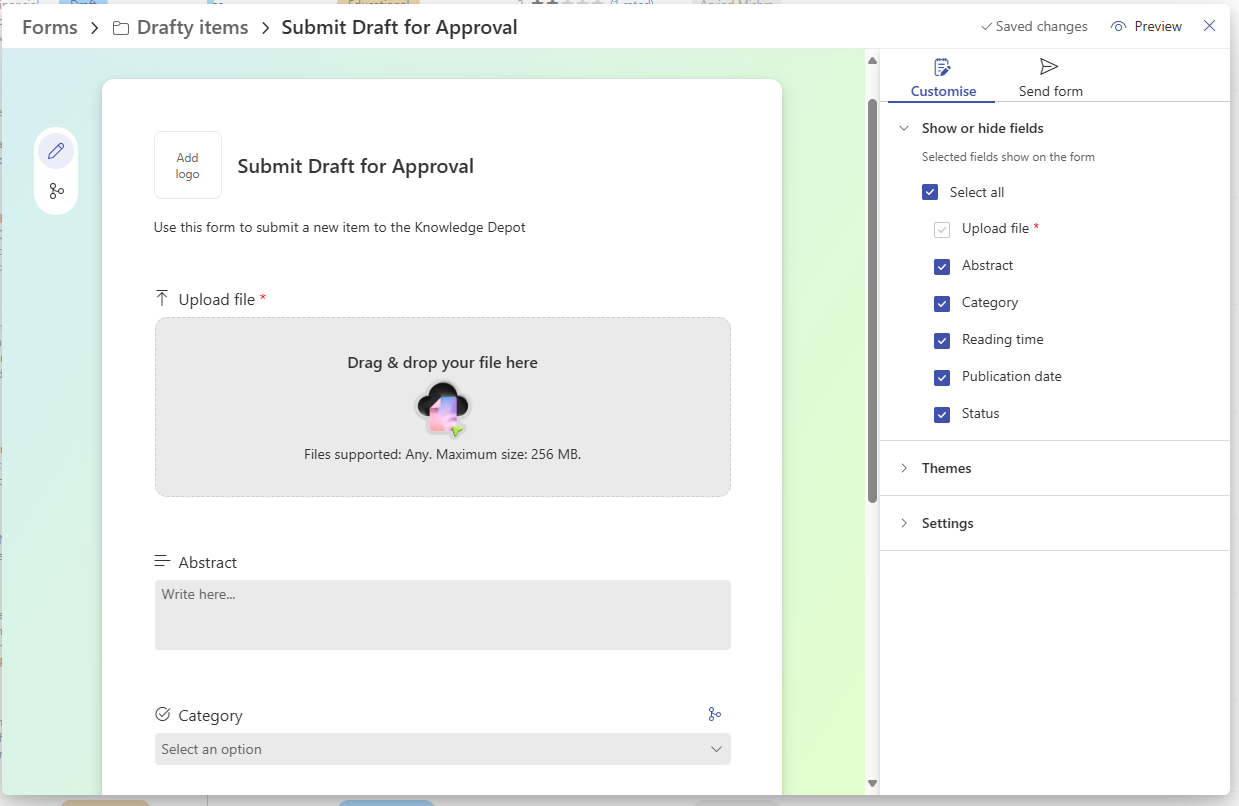
Similar to the structured experience you get with Microsoft Lists or Microsoft Forms, you can now create a custom form directly within a SharePoint document library. The form can be tied to any folder, including the root, and shared with internal contributors.
Instead of navigating the library and hoping users upload content correctly, contributors simply click the link, upload their files, complete the required metadata, and submit.
The result? Cleaner content, consistent metadata, fewer mistakes, and faster processes.
Why This Matters for Enterprise Teams
At Compass365, we help organizations streamline collaboration, modernize content management, and improve governance across Microsoft 365. This feature aligns perfectly with many of the challenges we solve for clients.
1. Reduced Permissions Complexity
No need to grant broad folder access. A form link is all users need to contribute files-keeping permissions cleaner and reducing risk.
2. Consistent Metadata
Forget missing tags or incomplete info. Forms enforce required fields like project name, category, department, or custom metadata you rely on for workflow, search, reporting, or compliance.
3. Cleaner, Controlled Submissions
You can restrict:
- File types
- Number of uploads
- Required fields
- Branching logic
This ensures every submission meets your standards which is ideal for governed libraries, IMS workflows, vendor documentation, or internal request processes.
4. A Simpler User Experience
Contributors never see the library UI. They land on a clean form, upload their file(s), and add the right information. This reduces errors and training needs and increases adoption.
5. Better Alignment with Governance and Compliance Goals
Organizations preparing for Microsoft 365 Copilot, enhancing metadata maturity, or improving content lifecycle management will see immediate benefits. Forms enforce structure, something Copilot and search depend on.
Learn more about why metadata matters for Copilot in the SharePoint Showcase: How Metadata and the Knowledge Agent Elevate Microsoft 365 Copilot Responses.
What You Should Know About This First Release
As with many modern SharePoint features, this is a strong first iteration with some limitations to plan around:
- Uploads must come from the user’s device (no template selection yet)
- Max upload size is 256 MB
- Files submitted through forms land in an internal subfolder (Power Automate can easily move them or connect them to approval flows)
- Forms currently only support internal contributors (external sharing is acknowledged as a future possibility)
These aren’t blockers, but they are considerations for solution design, especially in environments with strict governance requirements.
How Compass365 Can Help You Use This Feature Effectively
Document Library Forms may seem small at first glance, but when paired with strong metadata, governance, and process design, they can significantly improve:
- Document control workflows
- Intake and approval processes
- Project submission pipelines
- Vendor or contractor documentation intake
- Compliance-driven file collection
- Any scenario where metadata consistency matters
As part of our SharePoint Document and Records Management and AI Readiness Accelerator engagements, we help organizations:
- Standardize metadata and content models
- Improve library design and governance
- Build structured intake processes
- Automate routing and approvals with Power Automate
- Prepare content for Copilot and enterprise search
- Enhance the overall user experience in SharePoint
This new capability fits naturally into modern, well-governed SharePoint environments, and we’re excited to help organizations take advantage of it.
SharePoint Document Library Forms are a welcome upgrade for modern workplaces. They streamline file collection, enforce consistency, and bring a more intuitive, structured experience to one of the most common tasks in Microsoft 365. They’re simple, they’re smart, and for many organizations, they’ll save countless hours of manual cleanup and confusion.
If you’d like to explore how this feature fits into your current SharePoint environment or how improving metadata, governance, and structure can prepare your organization for Microsoft 365 Copilot, we’d love to talk.
Schedule a free strategy session with a Compass365 expert today.