At Microsoft Ignite 2025, one message came through loud and clear: AI isn’t just a feature, it’s becoming the foundation of the modern enterprise. Once again, Microsoft centered the event around AI, announcing advancements that push Copilot and agent-driven automation deeper into the core of Microsoft 365.
Microsoft believes the future of productivity lies in agentic AI, which are intelligent systems capable of acting on behalf of users, understanding context, and performing tasks with autonomy. In this post we’ll breakdown some the most important announcements and what they mean for organizations preparing for the next evolution of work with Microsoft 365.
Microsoft 365 Copilot and Work IQ
One of the biggest highlights was the introduction of Work IQ, a new intelligence layer that elevates Microsoft 365 Copilot from an AI assistant to a truly personalized collaborator.
What is Work IQ?
Work IQ enhances Copilot by helping it understand:
- How you work
- What you work on
- Your habits, patterns, and processes
- The content and context across emails, files, chats, meetings, and apps
Instead of providing generic, one-size-fits-all suggestions, Copilot uses Work IQ to deliver context-aware actions and recommendations tailored to each user and organization.
The result: Copilot becomes a knowledgeable digital teammate that understands your workflows, your projects, your communication style, and even organizational norms.
First-Class AI Agents for Productivity Apps
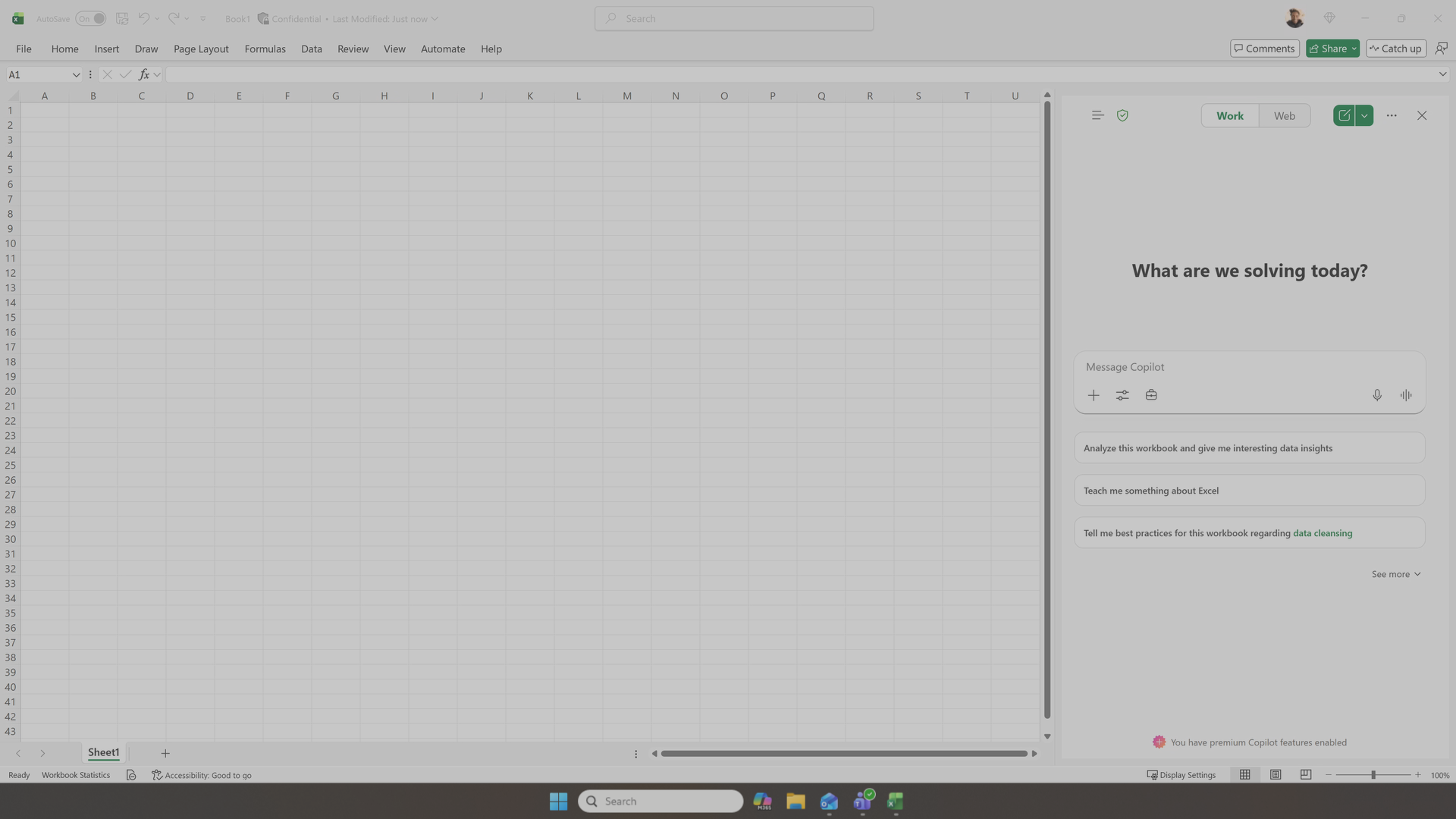
Image: Microsoft
Microsoft is bringing full agent functionality directly into its core Office apps accessible through Copilot Chat or Agent Mode in Word, Excel, and PowerPoint.
What these new agents can do:
- Generate and edit documents, spreadsheets, and presentations
- Pull contextual data from across your Microsoft 365 environment
- Ask clarifying questions to refine content
- Suggest structure, layout, and analysis methods
- Automate repetitive tasks and complex workflows
- Produce polished, high-quality outputs through natural-language prompting
This represents a major leap forward in productivity: content creation, planning, reporting, and analysis all become faster, more intuitive, and more automated.
Agent 365 — Governance & Control for the Agent Era
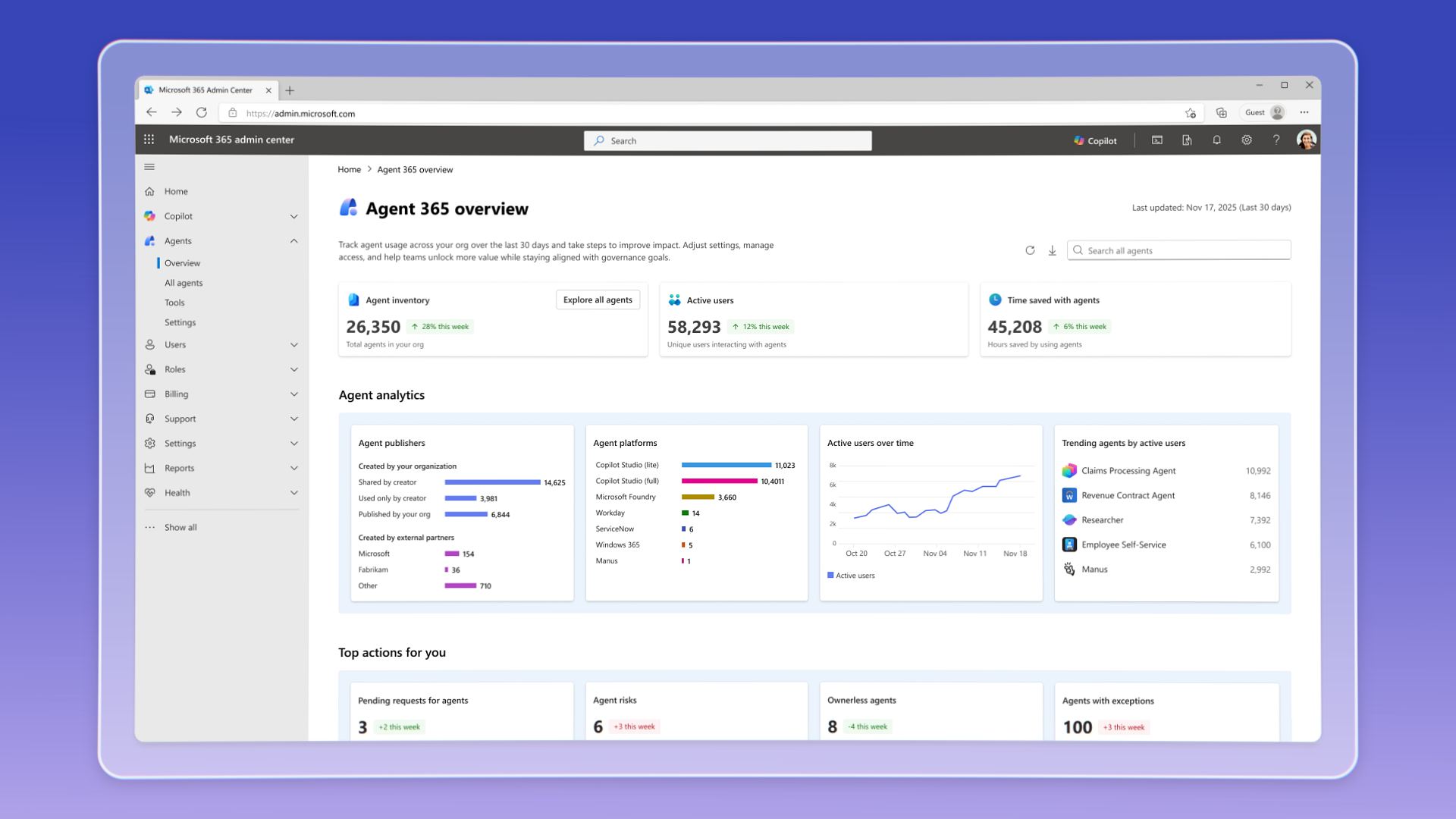
Image: Microsoft
As AI agents become more capable, governance becomes more critical. That’s where Agent 365 comes in, Microsoft’s new centralized control plane for managing agents across Microsoft and third-party ecosystems.
Capabilities include:
- Agent inventory and lifecycle management
- Access controls and role assignments
- Monitoring, logging, and auditing
- Compliance, governance, and identity policies
- Secure integration with enterprise systems
With Agent 365 and the expanded governance features across Microsoft Entra and Microsoft 365, organizations can safely scale agent usage while maintaining visibility and compliance.
This directly addresses traditional concerns around:
- Oversharing
- Data leakage
- Shadow IT
- Non-compliant automation
- Unmonitored AI activity
As enterprises begin adopting more agents, including custom agents, departmental agents, and embedded app-level agents, this central governance layer will become essential.
Teams and SharePoint Admin Agents
Two new administrative agents enter preview and represent Microsoft’s strongest push yet toward automating IT operations within Microsoft 365.
Teams Admin Agent (Preview)
The Teams Admin Agent brings intelligent automation to the Teams admin center by:
- Executing tasks such as user provisioning and meeting monitoring
- Automating repetitive operations
- Improving policy consistency
- Enhancing compliance
- Reducing manual effort for IT teams
This allows support teams to resolve issues faster and ensures more reliable enforcement of organizational policies.
SharePoint Admin Agent (Preview)
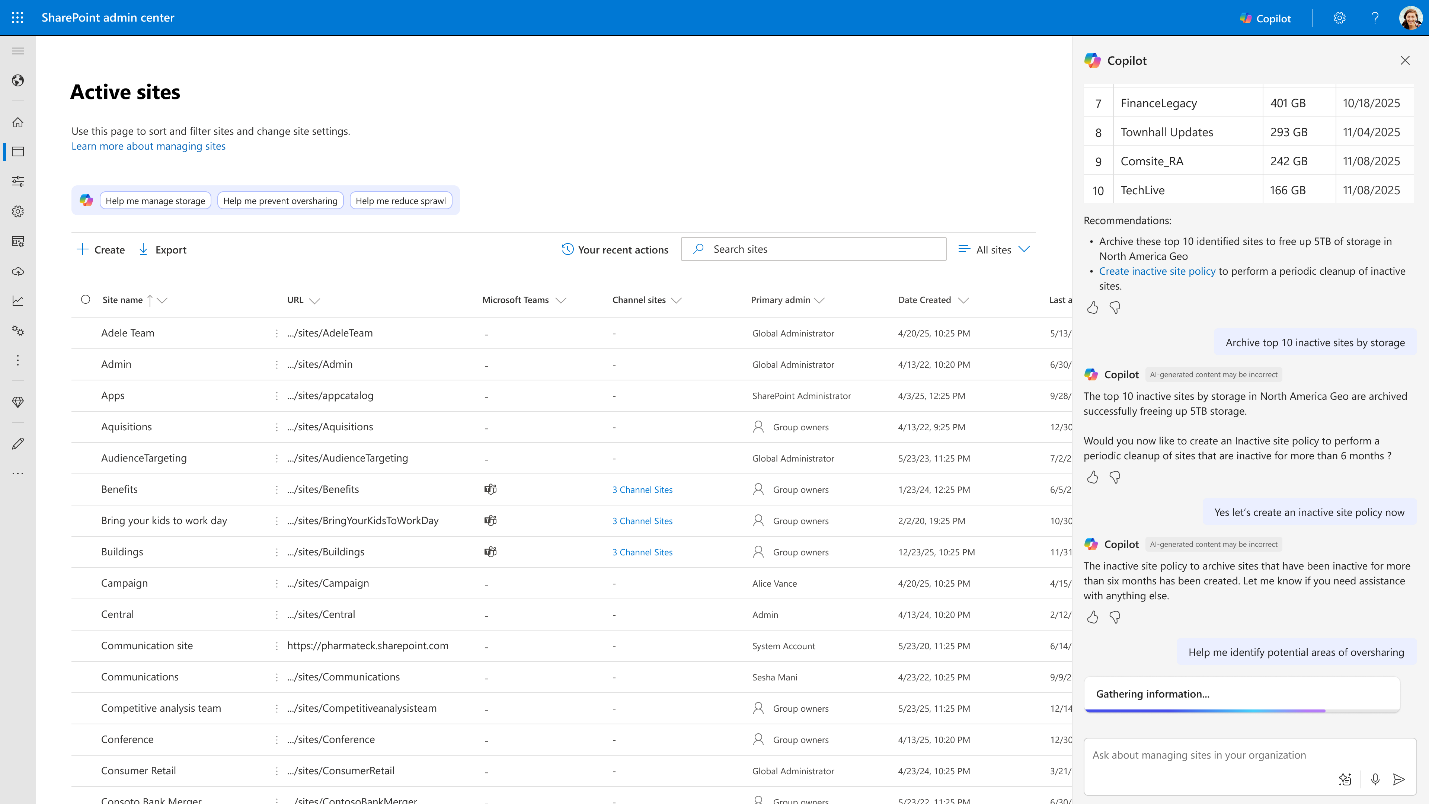
Image: Microsoft
The SharePoint Admin Agent focuses heavily on security, compliance, and content governance.
Key capabilities include:
- Identifying inactive or ownerless sites
- Detecting overshared or high-risk content
- Addressing permission sprawl
- Initiating automated remediation actions
- Enhancing visibility into AI-driven SharePoint activity
- Helping organizations prepare for increased Copilot usage
- Reducing manual workloads through automated governance
By automating both routine maintenance and high-risk scenarios, this agent helps organizations scale SharePoint governance as environments grow and AI usage expands.
Power Apps: Major Updates for Makers and AI Integration
Microsoft also announced significant enhancements to Power Apps, all designed to make app building faster, more intuitive, and more connected to the AI ecosystem.
New AI-Powered Maker Workspace (Preview)
A redesigned, unified workspace brings planning, data modeling, and app building into a single canvas. Makers can now generate multi-page, business-ready apps by chatting with Copilot, then refine them through point-and-click editing without switching between tools or views.
Model Context Protocol (MCP) Server (Preview)
The new MCP Server lets AI agents interact directly with Power Apps using a standardized protocol. Agents can submit approvals, retrieve records, fill out forms, and more, turning existing apps into reusable components of a broader enterprise AI ecosystem.
Enhanced Agent Feed & Unified Copilot Chat
An improved agent feed gives makers more control over tasks and visibility into agent performance. Starting Dec. 17, a unified Copilot Chat experience will preview inside model-driven apps, carrying context from Microsoft 365 into business apps to reduce context switching and streamline daily tasks.
Enterprise-Focused Security, Identity & Compliance Enhancements
Enterprise readiness was another major theme this year. Microsoft expanded identity and security capabilities across Microsoft Entra to support the rise of agentic AI.
Key updates include:
- Agent identities to securely authenticate and authorize AI agents
- Risk-based approvals to reduce manual access management overhead
- Improved access package governance
- Enhanced audit trails for both humans and agents
- AI-powered identity protection
- Network, data, and access protection updates tuned for agent workloads
- Expanded compliance tooling to track agent activity
As agents take on more tasks across Microsoft 365, ensuring they act safely and predictably becomes critical and these enhancements help organizations stay ahead of potential risks.
Other Announcements to Note
- Microsoft 365 Copilot Business offering announced to help small and medium sized businesses benefit from Copilot at $21 per user monthly.
- eSignature in Microsoft 365 now generally available allowing you to securely send documents for signature inside and outside of your org.
- Create SharePoint content like pages and lists directly from Copilot chat now available for the Frontier program.
- Microsoft Baseline security mode is now generally available allowing you to opt-in to automatic secure-by-default settings and reduce legacy risks.
Preparing for what is next
AI continues to drive Microsoft’s roadmap and Ignite made it clear that agentic AI will define the next era of work. Whether your organization plans to adopt AI today or takes a more cautious approach, one thing is certain, preparing your Microsoft 365 environment for AI is no longer optional, it’s foundational.
Clean content, strong governance, defined permissions, secure identities, and well-prepared users are essential to safely unlock AI’s full potential. If you’re planning for Microsoft 365 Copilot, exploring AI agents, or simply want to make your environment ready for the future, this is the moment to take action.
Compass365 can help you get there. Our AI Readiness Accelerator provides the structure, analysis, governance, and enablement needed to confidently prepare for Copilot and agent-driven automation.